Quick answer
Our overall pick is the TIME TIMER Home MOD, which its listing describes as silently operating with an optional audible alert and removable covers. The Learning Resources rainbow timer suits calm-down corners and classroom transitions, while the VISSE TimeBuddy suits homes that want a rechargeable option. The Secura is a battery-free choice for fridges and whiteboards.
Looking for the best visual timers for toddlers? A visual timer shows time passing as a shrinking disk, a color change or a countdown display, which can make a switch between activities easier to follow. We compared 13 models using manufacturer listings and specifications, and you can read more in our Managing Transitions category.
Quick picks
- Overall pick for silent countdowns: TIME TIMER Home MOD 60-Minute (see on Amazon)
- Rechargeable with count-up mode: VISSE TimeBuddy Digital Visual Timer (see on Amazon)
- No batteries needed: Secura 60-Minute Oversize Visual Timer (see on Amazon)
- Calm-down corners and transitions: Learning Resources Rainbow Visual Timer (see on Amazon)
- Magnetic mounting on metal surfaces: Keduzer Rainbow Magnetic Visual Timer (see on Amazon)
13 Best Visual Timers for Kids compared
| # | Product | Best for | Color | Height | Weight |
|---|---|---|---|---|---|
| 1 | TIME TIMER Home MOD 60-Minute | Best overall for silent operation with covers | Lake Day Blue | 3.47 in | 0.22 lb |
| 2 | VISSE TimeBuddy Digital Visual Timer | Best rechargeable with count-up mode | Green | 3.93 in | 0.33 lb |
| 3 | DoliWish Dinosaur Digital Toddler Timer | Best dinosaur design with a brushing setting | Light Blue | 4.09 in | 0.42 lb |
| 4 | Yunbaoit Rainbow Visual Timer with Case | Best with a protective case and nightlight | Blue Rainbow | 3.66 in | 0.3 lb |
| 5 | Learning Resources Rainbow Visual Timer | Best for calm-down corners and transitions | Rainbow | 8.58 in | 0.40 lb |
| 6 | HAUKINIX Digital Visual Timer, 99-Min | Best backlit smiley display for dim rooms | Blue, Colorful Display | 3.39 in | 0.21 lb |
| 7 | Yunbaoit Visual Timer with Night Light | Best for Pomodoro-style work intervals | Light Blue | 3.5 in | 0.35 lb |
| 8 | LIORQUE Rainbow 60-Minute Visual Timer | Best ready-to-run with AAA batteries included | Blue | 2.83 in | Not listed |
| 9 | HIPPIH Rainbow Visual Timer for Kids | Best compact for schoolbags | Blue | 4.3 in | Not listed |
| 10 | Nixroork 60-Minute Green Visual Timer | Best simple green disk with no setup | Green | 3.0 in | 0.2 lb |
| 11 | MEPHILIMIA Rainbow Visual Timer | Best rear mute switch on one AA battery | Blue-rainbow | 3.7 in | 0.24 lb |
| 12 | Secura 60-Minute Oversize Visual Timer | Best oversize mechanical with no batteries | Blue & Black | 7.5 in | 1.08 lb |
| 13 | Keduzer Rainbow Magnetic Visual Timer | Best magnetic mount for fridges and lockers | White | 3.1 in | Not listed |
How we chose
We compared manufacturer listings and specifications on Amazon as of November 2026. We did not test these timers by hand, so every fact in this roundup comes from the listing data. Where a spec figure looked implausible or conflicted with the listing title, we left it out.
We compared the features each listing states: how it displays time, whether it runs silently, what alert and volume options it lists, how it is powered, its listed size and weight, and any age guidance. We also looked at how completely each listing described these points, and we grouped the timers by the settings they are described for.
Best for everyday home routines
These timers suit family routines such as tooth brushing, bedtime and quiet time at home.
1. Best overall for silent operation with covers: TIME TIMER Home MOD 60-Minute

Pros
- Silent operation stated in the title
- Four removable silicone covers (sold separately)
- Light at about 0.2 pounds
Cons
- The four silicone covers are not included
- The listing does not mention a battery type
The Home MOD is a 60-minute countdown timer in Lake Day Blue. The listing highlights silent operation for sound-sensitive spaces and an optional audible alert. It has four removable silicone covers, which are sold separately and can change its look. The listing says the countdown can be understood by all ages and abilities, including children with autism or ADHD.
Best for: Families who want a silent 60-minute timer with an optional audible alert.
2. Best rechargeable with count-up mode: VISSE TimeBuddy Digital Visual Timer

Pros
- Rechargeable over USB-C
- Clock, alarm and count-up modes
- Three volume levels, including silent
Cons
- Needs charging to run, so it is not battery-free
- The listing does not say whether a charging cable is included
The TimeBuddy shows time passing with colorful countdown dots and a smiley face. Kids twist to set the time and press to start, and the listing says the timer remembers its last setting. It offers clock, alarm and count-up modes, three volume levels including silent, and adjustable brightness. The listing says it is USB-C rechargeable and runs without ticking.
Best for: Households that want a rechargeable timer with count-up mode and no spare batteries on hand.
3. Best dinosaur design with a brushing setting: DoliWish Dinosaur Digital Toddler Timer

Pros
- Dinosaur shape with colorful progress bars
- LED display readable from a distance
- Smooth edges noted in the listing
Cons
- The listing says it suits children over 3, so it is not positioned for younger toddlers
- The listing does not specify how long a charge lasts
This blue dinosaur-shaped timer shows time with colorful progress bars and an LED display. The listing says the display is easy to read from a distance and in low light. It can be set for up to 100 minutes and is described as quiet. The listing notes smooth edges for safety and says it suits children over 3. The title also lists a 2-minute toothbrush setting.
Best for: Kids who like dinosaurs and need a timer for toothbrushing routines.
4. Best with a protective case and nightlight: Yunbaoit Rainbow Visual Timer with Case

Pros
- Protective case listed
- Nightlight and mute or ringing alarm options
- Listed for kitchen, study or meeting use
Cons
- The listing does not mention a battery type
- The protective cover is described only as made of healthy materials, with no further detail
This blue rainbow disk timer counts down as the disk disappears, and the listing describes it as easy to understand. It comes with a protective cover, and the title also lists a night light. Alert options include mute, weak and loud, with a lasting alarm listed at either 3 or 30 seconds. The listing says it suits kitchen, homeschool, office and kids’ desk use.
Best for: Families who want a protective case and nightlight on one timer.
Best for classrooms and study time
These models fit classroom calm-down areas, homework sessions and focused work blocks.
5. Best for calm-down corners and transitions: Learning Resources Rainbow Visual Timer

Pros
- Bright rainbow lights with audio and visual alarms
- Designed for kids ages 3 and up
- Built for calm-down corners and sensory breaks
Cons
- The listing does not mention a battery type or charging method
- Listed height is about 8.6 inches, the largest in this roundup
This rainbow timer uses bright lights to show a clear countdown, with audio and visual alarms. The listing positions it for calm-down corners, transitions and sensory breaks, and says it is made for kids ages 3 and up. Its listed size is about 8.6 by 7.2 by 1.5 inches, and it weighs about 0.4 pounds. Easy-to-use time controls are listed for home, classroom or therapy settings.
Best for: Parents and teachers setting up calm-down corners and transition routines for kids 3 and up.
6. Best backlit smiley display for dim rooms: HAUKINIX Digital Visual Timer, 99-Min

Pros
- Backlit display for dim rooms
- Counts up, counts down and pauses
- Three volume settings including mute
Cons
- The listing does not mention whether it is rechargeable or battery-powered
- The listing does not mention a protective case
This blue digital timer has a smiley face, visual progress bars and a knob for setting time. The listing says it counts up, counts down and pauses, with a backlit display for dim rooms. It runs without ticking and has three volume settings: high, low and mute. Its listed size is about 3 by 3 by 1.5 inches.
Best for: Dim rooms and bedtime routines, where a backlit display and smiley-face countdown help.
7. Best for Pomodoro-style work intervals: Yunbaoit Visual Timer with Night Light

Pros
- Night light built in
- Three alarm modes including mute flash
- Described as a Pomodoro timer
Cons
- The listing does not mention a protective case
- The listing does not mention a battery type
This light-blue timer pairs a colored disk with a night light and three alarm modes, including a mute flash. Twist the knob clockwise to set the countdown. The listing describes it as friendly for toddlers, kids, adults and seniors, and says its simple operation can suit ADHD or autism. It runs silently, and its features describe it as a Pomodoro timer.
Best for: Kids or adults using focused work intervals, such as Pomodoro-style study sessions.
Best for kitchen and cooking timers
These timers are described for cooking and kitchen use alongside other settings.
8. Best ready-to-run with AAA batteries included: LIORQUE Rainbow 60-Minute Visual Timer

Pros
- Two AAA batteries included, per the title
- Rainbow pattern and quiet running
- Mute function among three volume levels
Cons
- The listing does not mention the weight
- The listing does not mention a protective case
This blue timer has a rainbow pattern and a knob you turn clockwise to add time. The listing says the shrinking time is visible, much like an hourglass, and that there is almost no sound while it runs. Three volume levels include a mute function. The title notes that two AAA batteries are included. The listing marks it for classroom and cooking use.
Best for: Kitchen or classroom use where batteries are already in the box.
9. Best compact for schoolbags: HIPPIH Rainbow Visual Timer for Kids

Pros
- Light and compact for bags
- Rear switch silences the alarm
- No ticking sounds
Cons
- The listing does not mention the weight
- The listing does not mention a night light or case
This blue rainbow timer is described as light and compact, so it can slip into a schoolbag or handbag. Twist the knob clockwise to set the time, then flip it back to zero to stop. Press the rear switch to silence the alarm. The listing says it has no ticking sound and mentions a loud alarm in the title. It is listed at about 4.3 inches tall.
Best for: Parents who pack a timer in a schoolbag or handbag for outings and classes.
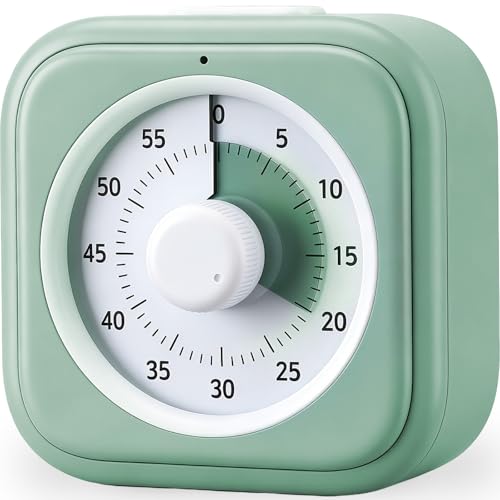
10. Best simple green disk with no setup: Nixroork 60-Minute Green Visual Timer
Pros
- No screens or setup
- Green disk shrinks as time passes
- Silent operation with optional alarm
Cons
- Only an optional alarm is described
- The listing does not mention a battery type
This green 60-minute timer shows time passing as the green disk shrinks. The listing says there are no screens and no setup: just turn the knob to set the countdown. It operates silently, with an optional alarm at the end. The visual dial is described as easy for all ages, including children with autism, ADHD or other learning differences.
Best for: Families who want the simplest possible set-and-go timer with no screen.
11. Best rear mute switch on one AA battery: MEPHILIMIA Rainbow Visual Timer

Pros
- Silent operation on one AA battery
- Rear mute switch
- Rainbow design with a large round face
Cons
- Requires one AA battery, and the listing does not say a battery is included
- The listing does not mention a magnet or mounting option
This large rainbow timer runs on one AA battery, and the listing says it operates silently with no ticking. Turn the center knob clockwise to set the countdown. A mute switch on the back stops the ringing when the timer sounds. The listing describes the analog countdown as understandable across ages and abilities, including autism and ADHD. It is listed at about 3.7 inches square.
Best for: Families who prefer a single AA battery and a rear mute switch.
Best for fridges, whiteboards and battery-free use
These timers focus on magnetic mounting or running without batteries.
12. Best oversize mechanical with no batteries: Secura 60-Minute Oversize Visual Timer

Pros
- No batteries needed
- Magnetic backing for refrigerators and whiteboards
- Large 7.5-inch face
Cons
- Heaviest pick in this roundup at about 1.1 pounds
- The listing does not mention an audible alarm
This 7.5-inch oversize timer is described as completely mechanical, so the listing says it needs no batteries. Its sky blue disc sits on magnetic backing panels for refrigerators and whiteboards, and it can also open to stand on desks or counters. The listing names uses such as cooking, meetings, bedtime routines and timeouts. It weighs about 1.1 pounds.
Best for: Parents who want a battery-free oversize timer on the fridge or a whiteboard.
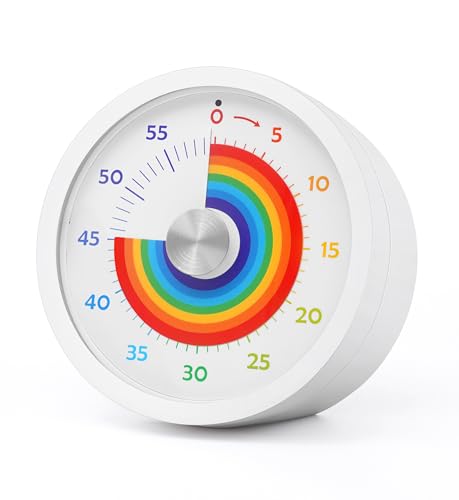
13. Best magnetic mount for fridges and lockers: Keduzer Rainbow Magnetic Visual Timer
Pros
- Strong magnets on the back
- Silent operation with no ticking
- Mute and loud alert settings
Cons
- Magnets work on iron surfaces, as the listing says
- Only two alert options: mute and loud
This white rainbow disk timer has powerful magnets on the back for attaching to an iron surface, such as a fridge door, whiteboard or locker. Turn it clockwise to set the time, and it counts down silently. The listing says it sounds an alarm when time is up and offers two alert options, mute and loud. It is listed at about 3.1 inches square.
Best for: Anyone who wants a timer stuck to a metal fridge door, locker or whiteboard.
How to choose the best visual timers for toddlers
A visual timer lets a child see how much time is left instead of reading numbers. The right model depends on where it will live and who will use it most. A kitchen, a playroom and a classroom corner each have different needs for noise, size and placement. For how timers can support switching between activities, see Helping Your Toddler Switch Between Activities Smoothly.
Sound matters. Several listings describe silent operation or no ticking, while others offer optional alarms or several volume levels. If your child is sensitive to noise, check whether the alarm can be muted or turned down. Also consider the power source. Some timers are rechargeable, some use AA or AAA batteries, and one is mechanical with no batteries listed. Follow the manufacturer’s manual for charging and battery replacement.
Look at the display and controls next. Some timers use colored disks, others use a digital countdown with a smiley face. Simple knobs and single buttons are easier for young children to use. Read the age guidance in each listing, since some state ages 3 and up.
Size and portability matter too. Compact models fit in a bag, while larger faces are easier to see across a room. If you want to attach a timer to a fridge or whiteboard, check for magnetic backing. For broader guidance on daily structure, see Parenting Challenges.
What to look for
- Silent running or an alarm that can be muted or lowered
- A power source you can keep running, such as rechargeable, AA or AAA, or no batteries
- A display your child can read at a glance, such as colored disks or a large countdown
- Simple controls, such as a knob or single button
- Listed age guidance and a size that fits the room
FAQ
Can a visual timer help a toddler with transitions?
A visual timer shows the time left as a shrinking disk or a color change, which some families use to give a heads-up before switching activities. Results vary by child. For more on switching smoothly, see Helping Your Toddler Switch Between Activities Smoothly.
Should I choose a silent timer or one with an alarm?
Many of these listings describe silent running and optional alarms. A silent timer may suit quiet rooms, while an alarm helps when a child is not watching the clock. Check whether the alarm can be muted or set to a lower volume.
How should I handle batteries and charging?
Follow each manufacturer’s manual for batteries and charging. Keep batteries and small parts out of reach of young children. If a battery is swallowed, contact Poison Help right away through poison.org.
What if my child gets upset when the timer goes off?
Big feelings at transitions are common. Our article on why tantrums happen and how to respond covers ways to stay calm and consistent.
References
- Amazon product listings and manufacturer specifications (accessed November 2026)
- Poison Help, American Association of Poison Control Centers